Programmatic reading order doesn’t match the visual layout
What is the problem?
Individuals with vision impairments might not be able to see images. Text alternatives are the way they can gain the same meaning.
Warning, just because an image is missing a text alternative, does not mean that the text alternative needs to describe what the image is of. Once an image has been found that does not have a text alternative, it must be determine if the image is decorative or not. Images that are clearly decorative should be coded as decorative element is not hidden from screen readers.
Image element missing a text alternative
<img src="TwitterGender.png" scale="0">
Without an alt attribute define most screen reader will read the file name to the user.
In the video above, a screen reader announces the following. Screen Reader Announces:Twitter Demographics by Gender
Here is a pie chart that reveals the distribution of men and women on Twitter.
Graphic: TwitterGender.png
The announcement of the filename after the role of “graphic” is the screen readers attempt to provide any information it can about an image that does not have a text alternative defined.
Add a text alternative via the alt attribute
The alt attribute was introduced to HTML 2.0 in 1995. It became a requirement for the img and area elements in 1999 as part of the HTML 4.01 W3C recommendation.
<img src="example.png" alt="[place text alternative here]" />
<input alt="[place text alternative here]" src="example.png" type="image" />
H37: Using alt attributes on img elements
Correct text alternative for the above example would be alt="Twitter Gender Distribution: 53% female, 47% male."
Non-image element missing a text alternative
While the use of symbols for words can help visual learners, they are often added to HTML without the use of an img element. Without the img element most automated accessibility checkers will miss that these elements are not providing a text alternative.
NVDA reads the first example from Equal Entry Icon Font Example page as “Crafted with by Equal Entry.” The heart icon after “with” is skipped.
Add a text alternative via the aria-label attribute
If a page has elements that do not support alt attributes (such as i, div, or figure elements), then we can make them accessible by giving them aria-label attributes.
We can also specify a role="img" attribute for these elements, which tells screen readers that the elements are pictures.
In this example, because the heart icon is an i element and we want it to be announced, we give the i tag two new attributes: role="img" and aria-label="love".
NVDA reads the last example from Equal Entry Icon Font Example page as “Crafted with Graphic Love by Equal Entry.”
The following video provides additional information about using the aria-label attribute:
ARIA6: Using aria-label to provide labels for objects
Adding text alternative via the Bootstrap sr-only class
Bootstrap’s screen reader only class was created, prior to the general browser support of the aria-label attribute, to provide information to screen readers without it being visually displayed.
However without specifying the role="img" attribute this solution will result in a screen reader announcing the text alternative without identifying that a graphical element is being used.
NVDA reads the second example from Equal Entry Icon Font Example page as “Crafted with”, “Love”, “by Equal Entry.” Note that NVDA represents the line as 3 diffrent elements.
Bootstrap Accessibility Documentation
Interactive map missing a text alternative
While the directions to embed Google Maps into a website make doing this very quick, if a text alternative isn’t provided the address being shared here wouldn’t be available to someone relying on a screen reader.
Providing an accessible alternative to an interactive map
Maps are complex images, and making them accessible requires more work than an ordinary picture.
The article “Accessible Maps on the Web” by Thomas Logan documents how he was able to create an accessible map using Google API. However, due to the lack of documentation and difficulty in creating accessible versions of server-side image maps, it is best to avoid using server-side image maps whenever possible, including Interactive Environmental Systems Research Institute (ESRI) and Google Maps.
The most straightforward option is to provide addresses as text, in a list or data table. A control can be added to sort the listings, relative to a starting position.
[caption id=”attachment_7797” align=”alignnone” width=”754”] Data Table named Nearest Signal Locations with the intersection, distance in miles, and date created information displayed for four results.[/caption]
Define text alternative for a client-side image map and each area
If geometric regions can be used to define the interactive areas of a map, a more accessible client-side image map could be used.
Client-side image maps are a single image divided into geometric regions. Allowing people to interaction with the individual regions. Client-side processing allows for exploration of regions target URLs before making a selection, making them more accessible than server-side image maps.
The image as a whole needs to provide a text alternative for general orientation. As well, the individual regions need to describe what action will take place if selected.
While not a map, the example below from the Wikipedia page for Image map demonstrates this technique.
[caption id=”attachment_4702” align=”alignnone” width=”720”] Explore the 1851 painting “A Literary Party at Sir Joshua Reynolds’” by D. George Thompson. Client-side processing allows distinctions between individuals in the painting to be made. The unique regional targets provide a way to learn more about the painting’s subjects.[/caption]
H24: Providing text alternatives for the area elements of image maps
CAPTCHA requires user to make a visual assessment
CAPTCHA is an acronym for “Completely Automated Public Turing test to tell Computers and Humans Apart”. CAPTCHA is a challenge-response test. Used as a way to reduce, or prevent, computers from performing mass submissions. Entries to online voting, sweepstakes entries, feedback forms, etc. CAPTCHA is often associated with visual tests. People deciphered a visual images of distorted text, but all users regardless of ability need a way to complete a CAPTCHA provided.
[caption id=”attachment_7804” align=”alignnone” width=”462”]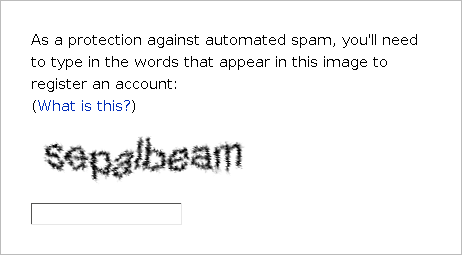 The words “sepal” and “bean” will not be announced by screen readers. How could a blind person pass this CAPTCHA?
(By Nikolay Shaplov - Transferred from en.wikibooks to Commons by Adrignola using CommonsHelper., GPL, https://commons.wikimedia.org/w/index.php?curid=12813815)[/caption]
Provide an audio CAPTCHA option
After getting negative feedback from Jane, Steve decided to use the reCAPTCHA tool. It allows people to complete an audio-based CAPTCHA, rather than a sight-based one.
[caption id=”attachment_7805” align=”alignnone” width=”312”] Even if someone could not see “sclt …was here”, they could still select the speaker icon to take an audio CAPTCHA.[/caption]