Instructions are not provided
What is the problem?
Instructions should be provided for any error checking; for example, if any field requires data entry be in a specific format.
Individuals should be told if all fields are required, or how to distinguish required fields.
Form includes red * without explaining what it means
While it is a common way to indicate required fields it doesn’t replace the need to include directions to insure understanding.
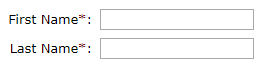
Add directions under the header of the form
“Required fields are indicated with a red * “ should be added before the first control within the form.
Formatting requirements not explained before submission
If a form control requires the user to enter data in a way that meets a specific requirement those requirements must be explained to the user as part of the initial data entry.
For example when creating a new account password the requirements for the password must be explained as part of the directions. It is not acceptable to explain requirements after the data entry as part of the error checking.
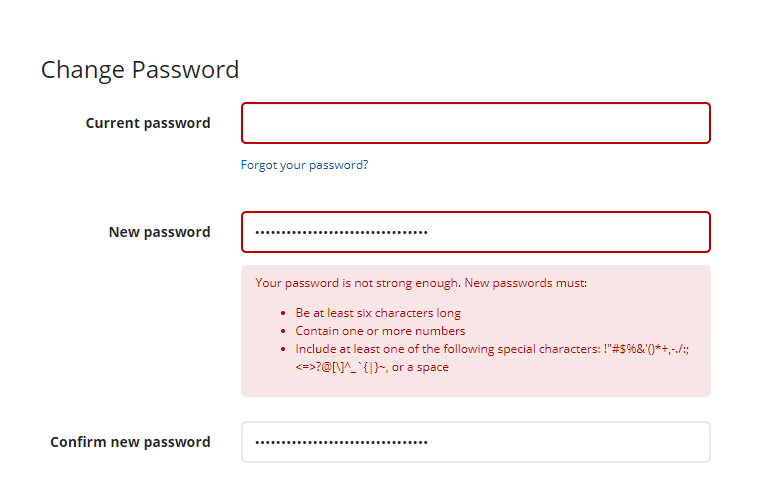
As an alternate example, where directions are not needed, is on a form control with no data validation.
Directions explain all data validation requirements
While this could be a simple text base description of the requirements, the example below shows a more sophisticated solution.

Some examples
| Control Type | Suggested Directions |
|---|---|
| username@domain.com | |
| Password | Minimum 6 characters, at least on number, symbol, lower case and upper case letter |
| Phone number | ### - ### - #### |
| Social Security Number | ### - ## - #### |
Resources
- G89: Providing expected data format and example
- G184: Providing text instructions at the beginning of a form or set of fields that describes the necessary input
- H90: Indicating required form controls using label or legend
- G13: Describing what will happen before a change to a form control that causes a change of context to occur is made