Overview of Audio-only and Video-only (Prerecorded)
Purpose
This standard ensures that audio-only content – for example, a podcast – is accompanied by a text alternative, such as a transcript. The same is true for video-only content, such as an animated GIF.
Enabling people to access content in multiple ways helps to ensure that everyone can use it. A person who is deaf or hard of hearing may be excluded from audio-only content. Likewise, a person who is blind may be excluded from video-only content. Someone who is deaf and blind may be excluded from both audio and video content. However a screen reader or braille display can be used to read a transcript.
Visitors should not have to request information in a format they need. Web accessibility provides anonymity to individuals with disabilities. With an accessible website, no one needs to know which site visitors have a disability.
How to Test
- Review each instance of audio and video content for a transcript, failure if transcript not provided
- Review any transcript found for possible failures, transcript omits some important information
- Sound events
- Visual events
Best Practices
Provide detailed transcripts
Sound only audio content - podcasts
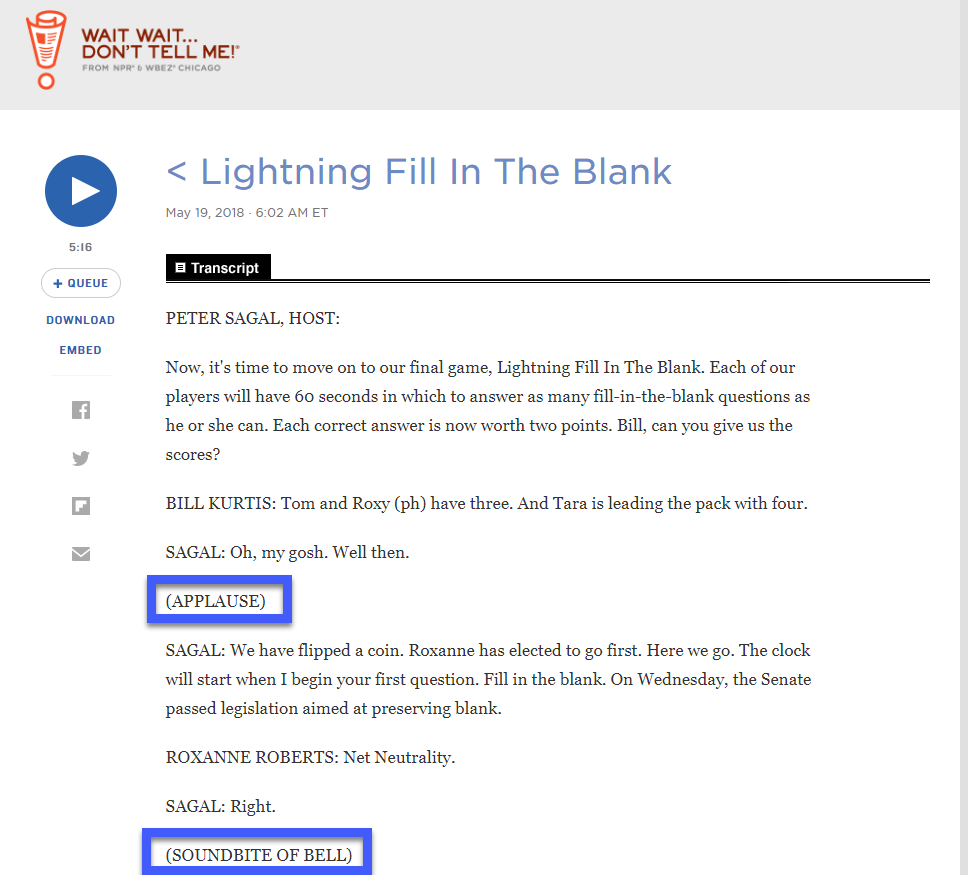
Transcripts of audio content should be more than who said what. Sound effects can play an important role in understanding.
In this example from The NPR (National Public Radio) show “Wait Wait… Don’t Tell Me”, a transcript denotes non-dialogue sounds between parentheses. The shows uses a bell to denote a correct answer, and a gong is uses when time is out. Reading the show with out these sound effect wouldn’t be the same as listening.
Video-only - no dialogue
As you learned in Success Criteria 1.1.1 Text Alternatives every image needs a text alternative. A video, being a series of images, needs a detailed transcript.
As videos have become easier to make and production quality has improved they are becoming more widespread. While video can enhance learning and be entertaining, they should never be the only way information is provided.
Avoid animated GIFs
Animated GIFs are distracting to people with Attention Deficit Disorder (ADD). Some individual browsers have implemented workarounds to stop or restrict animated GIFs. Page authors should not assume that the animated GIF they added will play, or be understood by all people.
Exceptions
Prerecorded audio only or video only content, is a limited subset of the more generally discussed audio video (AV) content. Below are some examples of AV content for which a different set of standards apply:
- Videos must adhere to Success Criteria 1.2.2 Captions (Prerecorded), 1.2.3 Audio Description or Media Alternative (Prerecorded) and 1.2.5 Audio Description (Prerecorded).
- Live-streamed content must adhere to Success Criteria 1.2.4 Captions (Live).
Prerecorded content that is a media alternative for text
Must be clearly labeled as an alternative to text provided.
Audio
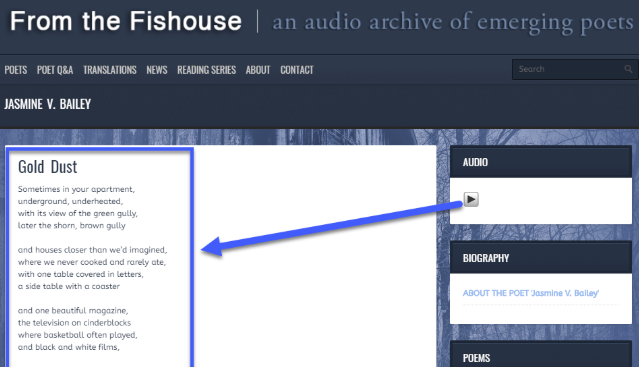
Giving people the option to listen to an audio file instead of reading a large amount of text is wonderful for audio learners.
In this example From the Fishouse the poem “Gold Dust” is displayed, as text, and an audio option is provided to hear the author perform their poem. As a clear audio text alternative no Transcript link is needed.
Video
Sharing a video of someone moving through a set of step by step directions, can help visual learners.
In this example from Refinery29, a 1 minute video accompanies the instructions for making The Simple Cheesy Dip Recipe You NEED At Your Friendsgiving. The video provides no additional information and the text below the video makes it clear that it is a walk-through of the full recipe.
